Microsoft Windows Server 2025 Standard Guida all'installazione
Questa guida gratuita passo passo ti accompagna nel download, nell'installazione e nell'attivazione di Microsoft Windows Server 2025 Standard — con screenshot reali per ogni passaggio, in 12 lingue.
Scarica l'installer
Scarica la versione desiderata con il seguente link di download.
Disponibile in 2 lingue —
Leggi questo molto attentamente
- Processore da 1 gigahertz (GHz) o più veloce o a 64 bit (x64)
- 2 gigabyte (GB) di RAM
- 60 GB di spazio disponibile su disco rigido
- Dispositivo grafico DirectX 9 con driver WDDM 1.0 o superiore
Installazione passo passo
We suggest finishing the installation and activation of the product first, and only then signing in with your Microsoft account.
When the download finishes, write the ISO file to a DVD or copy it to a USB stick. Start your PC or laptop from that DVD or USB drive and the setup program launches automatically. Work through the on-screen steps to finish the installation.
The Microsoft installation provided here comes with a 180-day trial period.
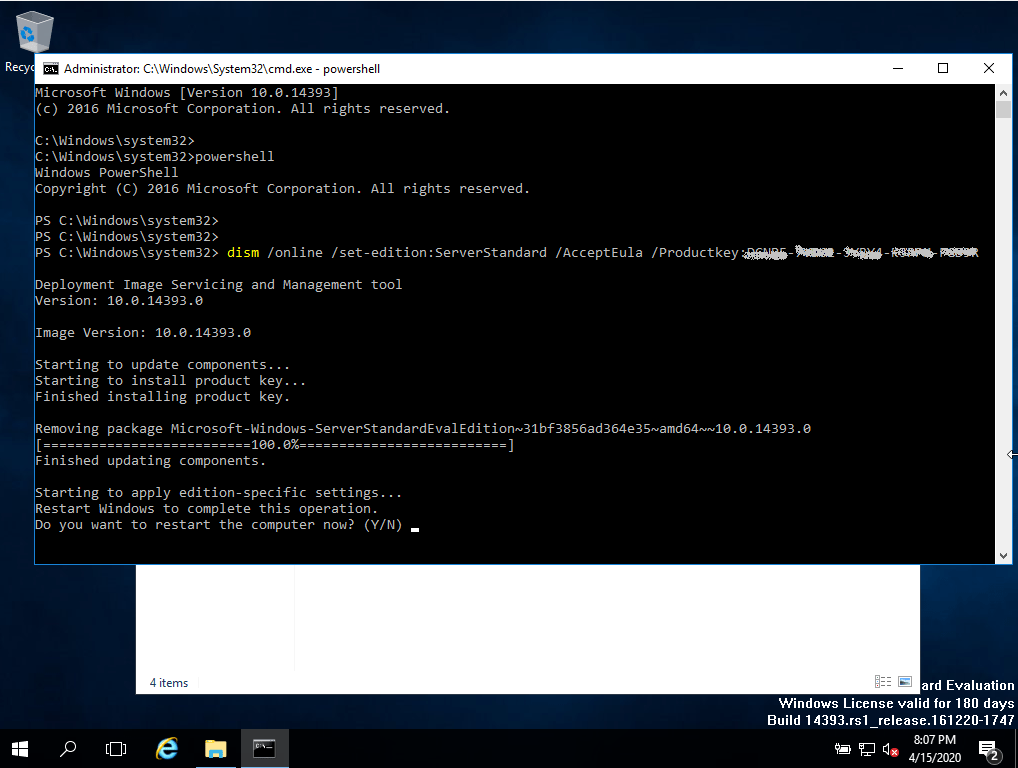
Run the commands below to switch it to the full version:
Launch PowerShell with administrator rights.
Type this command into the console: DISM /Online /Set-Edition:ServerStandard /ProductKey:XXXXX-XXXXX-XXXXX-XXXXX-XXXXX /AcceptEULA (This first step uses a generic trial key; the full version is activated afterwards.)
You will be prompted to restart the computer.
After the restart, launch PowerShell as administrator again and run these commands: slmgr -ipk XXXXX-XXXXX-XXXXX-XXXXX-XXXXX (put your purchased product key in place of the “X’s”) slmgr -ato
Your server should now be activated.
Attiva la tua licenza
Segui questi 5 passaggi — l'intera sequenza richiede meno di due minuti.
Open Server Manager and click "Activate Windows" in the dashboard.
Scegli la tua lingua
I supporti di installazione sono disponibili in 2 lingue. Ognuno è il supporto originale — solo la lingua dell'interfaccia è preimpostata.
| Lingua | 64-bit | 32-bit |
|---|---|---|
 Deutsch | Herunterladen | Herunterladen |
 English | Download | Download |
Domande frequenti
Posso installare Windows Server su hardware consumer?
+
Sì — Windows Server funziona sulla maggior parte dell'hardware x64 moderno. Per ruoli Hyper-V o controller di dominio è consigliata RAM ECC. Per file server autonomi o ambienti di test, qualsiasi PC a 64 bit con 4 GB+ di RAM va bene.
Qual è la differenza tra Standard e Datacenter?
+
Standard consente 2 macchine virtuali per licenza. Datacenter consente VM illimitate e aggiunge funzionalità come Storage Spaces Direct e Software-Defined Networking. Per la maggior parte delle PMI, Standard è sufficiente.
Servono CAL (Client Access Licences) separate?
+
Sì. Le licenze server coprono solo il sistema operativo. Ogni utente o dispositivo che si connette al server ha bisogno di una CAL. Le distribuzioni RDS richiedono una CAL RDS aggiuntiva.
Posso attivare per telefono?
+
No. Microsoft ha eliminato gradualmente l'attivazione telefonica per la maggior parte dei prodotti. Tutte le attivazioni passano ora dai server online di Microsoft — assicurati che il server abbia accesso a internet durante l'attivazione.
Ti serve una mano?
Microsoft non offre più l'attivazione telefonica
ISO files are original Microsoft Volume Licence media. Evaluation editions expire after 180 days. Ensure you have the correct edition licence before activation.
I file sono ospitati sul nostro CDN sicuro. Clicca su Scarica per iniziare.