
Looking for a Microsoft Office Professional Plus 2021 official download that actually works? You are in the right place. Setting up Office 2021 Professional Plus takes about 10 minutes from download to activation, and you only do it once, because this is a lifetime license, not a subscription.
This guide walks you through every step: checking your PC, removing older Office versions, getting the official office 2021 professional plus download 64-bit, installing the suite, and activating it with your product key (online or by phone). It is written for regular users, with no technical experience needed.
Do not have your license yet? Get your Microsoft Office 2021 Professional Plus key here delivered to your email within minutes with the official installer link.
What You Will Need Before Starting
- Your 25-character product key (sent to your email after purchase)
- A Windows 10 or Windows 11 PC with administrator rights
- An internet connection for the download and activation
- About 10 minutes of your time
What Is Included in Office 2021 Professional Plus
Office 2021 Professional Plus is Microsoft’s one-time-purchase Office suite. You get the full desktop versions of:
| Application | What it’s for |
|---|---|
 Microsoft Word 2021 Microsoft Word 2021 | Draft crisp documents using advanced formatting tools and reliable crash recovery protocols to keep your work secure. |
 Microsoft Excel 2021 Microsoft Excel 2021 | Run high-level dataset analysis with dynamic arrays, XLOOKUP, and faster calculation across complex cell layers. |
 Microsoft PowerPoint 2021 Microsoft PowerPoint 2021 | Design professional slide decks with smooth transitions, built-in recording tools, and custom caption formatting. |
 Microsoft Outlook 2021 Microsoft Outlook 2021 | Keep communication loops organized. Efficiently manage business emails, team calendars, dynamic contacts, and tasks within an upgraded interface. |
 Microsoft OneNote 2021 Microsoft OneNote 2021 | Log concepts, collect meeting data, track project scopes, and organize digital notes seamlessly across local machines. |
 Microsoft Access 2021 Microsoft Access 2021 | Structure high-capacity business databases. Run local inventory networks, relational tracking forms, and operational query scripts cleanly. |
 Microsoft Publisher 2021 Microsoft Publisher 2021 | Design polished flyers, brochures, newsletters, and page layouts with precise control, no graphic design background needed. |
Everything works fully offline after activation. There is no monthly fee, and your apps never expire
Good to know: Project and Visio are not part of Office 2021 Professional Plus. They are separate products with their own licenses, so be cautious of any store that advertises them as included for free.
System Requirements for Microsoft Office 2021 Professional Plus
| Requirement | Minimum |
|---|---|
| Operating system | Windows 11 (recommended) or Windows 10 |
| Processor | 1.6 GHz, 2-core (64-bit recommended) |
| RAM | 4 GB |
| Hard disk space | 4 GB free |
| Display | 1280 x 768 resolution or higher |
| Graphics | DirectX 9 or later, with WDDM 2.0 or higher on Windows 10 |
| Internet connection | Required for installation, product activation, and updates |
Almost any PC made in the last 10 years meets these requirements. Note that Office 2021 does not run on Windows 7, Windows 8, or Windows 8.1, and since Microsoft ended Windows 10 support in October 2025, we recommend installing on Windows 11 for the best long-term experience.
Step 1: Uninstall Older Versions of Office
Before you install Office 2021, it is important to uninstall any other version of Microsoft Office already on your computer. Having multiple versions can cause activation errors or block the installation.
- Close Office applications. Make sure Word, Excel, Outlook, and any other Office app are fully closed.
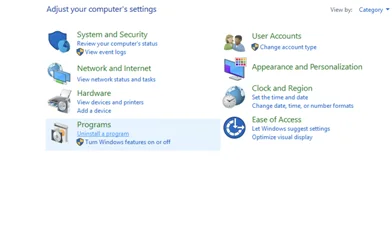
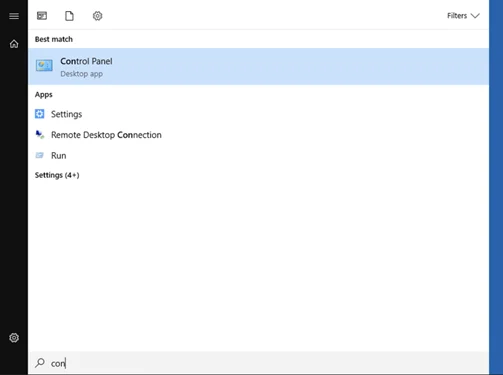
- Open Control Panel. Go to Programs and Features, then Uninstall a program.
- Locate Microsoft Office, select it, and click Uninstall.
- Follow the uninstall wizard, wait for it to finish, then restart your computer.
Do not worry, uninstalling Office does not delete your documents. Your Word, Excel, and PowerPoint files stay safely on your PC and will open in Office 2021.
Tip: If a normal uninstall fails or leaves leftovers, Microsoft’s free SaRA tool (Support and Recovery Assistant) removes Office completely in one click.
Step 2: Download Office 2021 Professional Plus (Official Installer)
Use the buttons below to start your office 2021 professional plus download 64-bit. Both files are the genuine Microsoft installer, so your office 2021 pro plus download is safe, clean, and ready to activate with the key from your order.
Download Office 2021 Pro Plus (64-bit)
Download Office 2021 Pro Plus (32-bit)
Most users want the 64-bit version. Choose 32-bit only on older PCs or for legacy add-in compatibility.
Browser warning? Windows sometimes shows a SmartScreen notice for downloaded installers. This is normal. Click More info, then Run anyway to continue.
Office 2021 download options explained
When people search for an office 2021 download, they usually mean one of these, and our file covers them all:
- 64-bit or 32-bit: the 64-bit build is right for nearly every modern PC. The links above give you both.
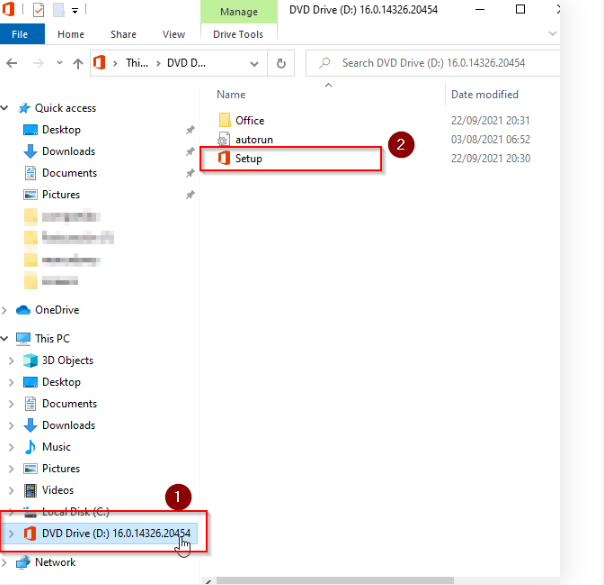
- Offline installer: our file is a full office 2021 offline installer, so once it is on your PC you can install with no internet connection needed. This is ideal for machines with slow or limited connectivity.
- ISO download: if you prefer an office 2021 ISO download to mount or burn, the official Microsoft tool method below produces a local copy of the files you can package as an ISO.
- With product key: the installer is the same for everyone. You simply download Office 2021 with product key activation done at the end in Step 4 using the key from your order.
Prefer the official Microsoft tool? Download Office 2021 from Microsoft manually
You can also build the download office 2021 professional plus files yourself using Microsoft’s free Office Deployment Tool. This is the same method IT departments use to download the Office LTSC 2021 installation files:
- Download the Office Deployment Tool from Microsoft and run it to extract
setup.exe. - Save the
configuration.xmlfile (provided with your order) in the same folder. - Open Command Prompt as administrator in that folder and run
setup.exe /download configuration.xmlto fetch the official files, thensetup.exe /configure configuration.xmlto install.
Once the install finishes, jump to Step 4 to activate Office 2021 with your product key.
Step 3: Install Office 2021 Professional Plus
Wondering how to download and install Office 2021 once the file is on your PC? It is just a few clicks:
- Open your Downloads folder and find the installer you just saved.
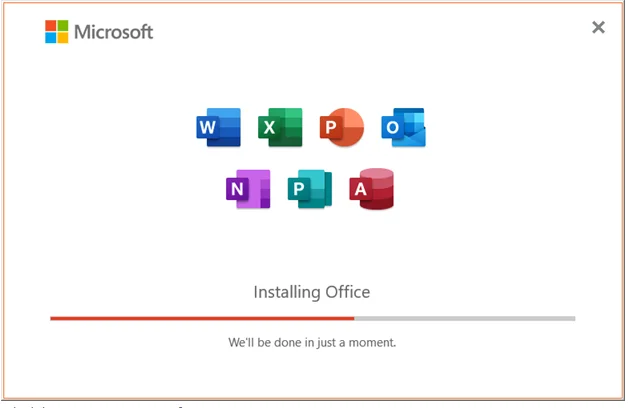
- Right-click the file and choose Run as administrator. Setup starts, copies the core files, and installs Office in the background.
- Leave it running and do not turn off your PC. When you see the You are all set message, the install is complete and your Office apps are ready.
Step 4: Activate Office 2021 With Your Product Key
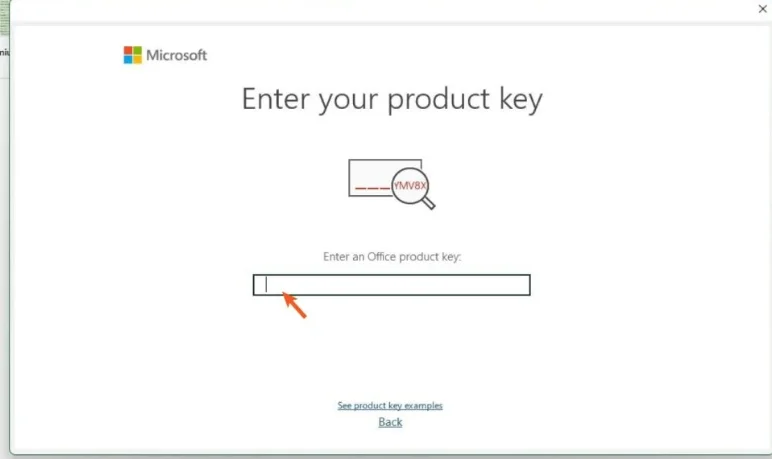
- Open any Office app. Word is easiest.
- If the activation wizard appears automatically, enter your 25-character product key and click Next.
- If no prompt appears, go to File > Account > Change Product Key (or Activate Product), then enter your key.
- Choose Activate via the Internet and wait a few seconds while Office contacts Microsoft’s servers.
- You will see a confirmation that activation was successful. Restart the app, and you are done.
Alternative: Activate Office 2021 by Phone (Confirmation ID)
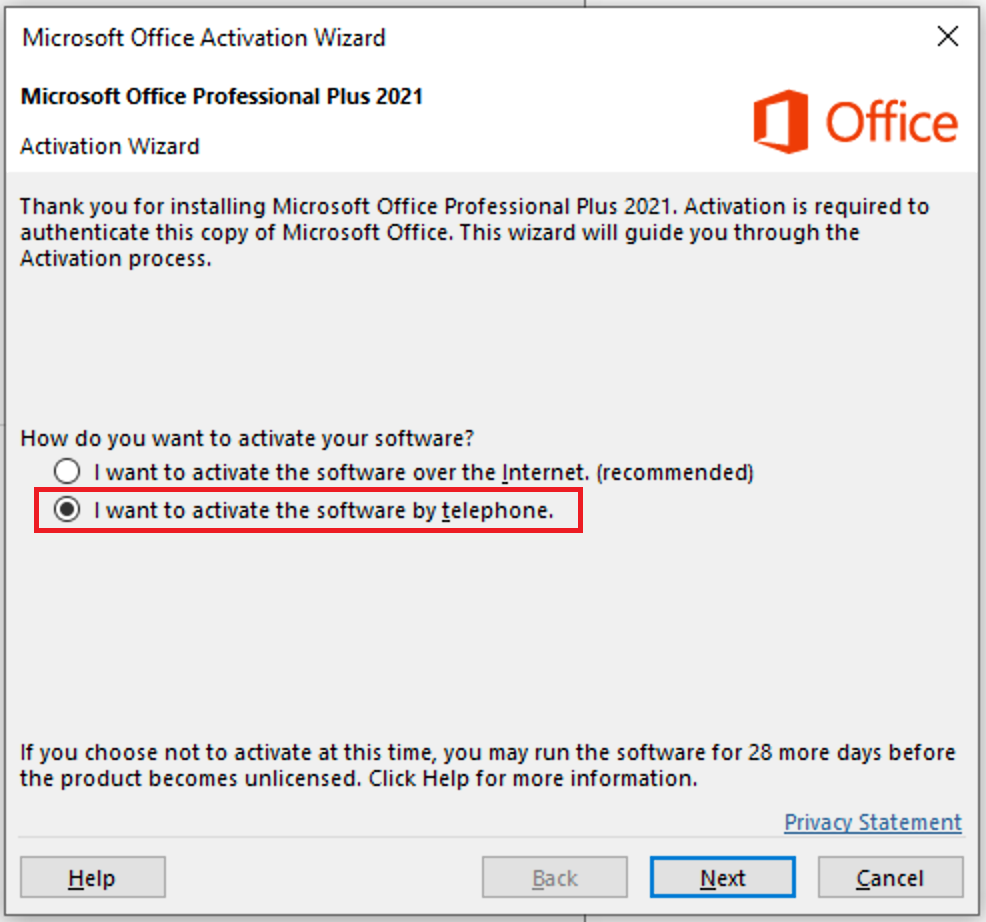
Some Office 2021 license types activate by telephone instead of online. This is a standard, official Microsoft method, and it is faster than it sounds:
- Open an Office app and start activation, then choose phone activation when asked.
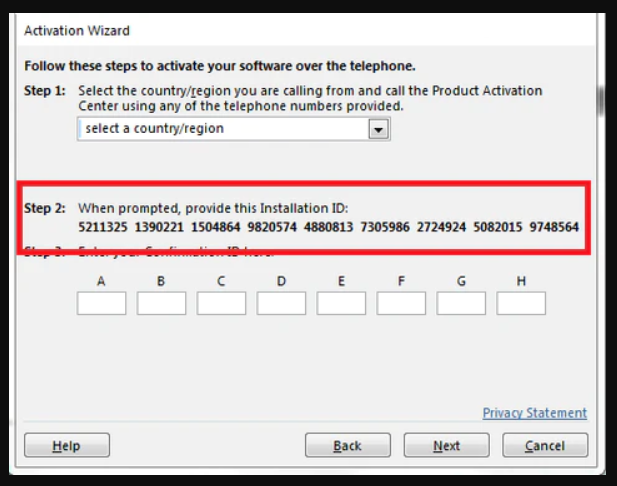
- Office shows you a long Installation ID on screen.
- Enter that Installation ID into our free Microsoft Confirmation ID (CID) tool to get your Confirmation ID instantly.
- Type the Confirmation ID back into the activation window and click Next.
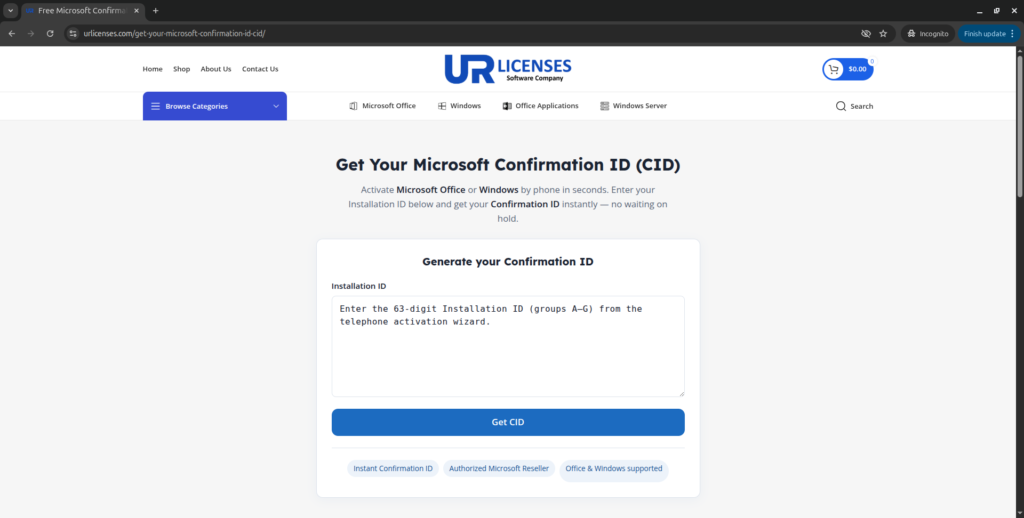
Your Office 2021 is now permanently activated, even on PCs with limited internet access.
Troubleshooting Common Issues
“This product key has already been used.”
Make sure you removed all older Office installations (Step 1), restart your PC, and try again. If it persists, contact our support, we respond fast.
Antivirus blocks the installer.
Some third-party antivirus tools flag any .exe downloaded from the internet. Temporarily pause the antivirus, install Office, then turn it back on.
Installation freezes or fails.
Check that you have at least 4 GB of free disk space and a stable connection, then run the installer again as administrator. Running Microsoft’s SaRA cleanup tool first fixes most stubborn cases.
Activation error after entering the key.
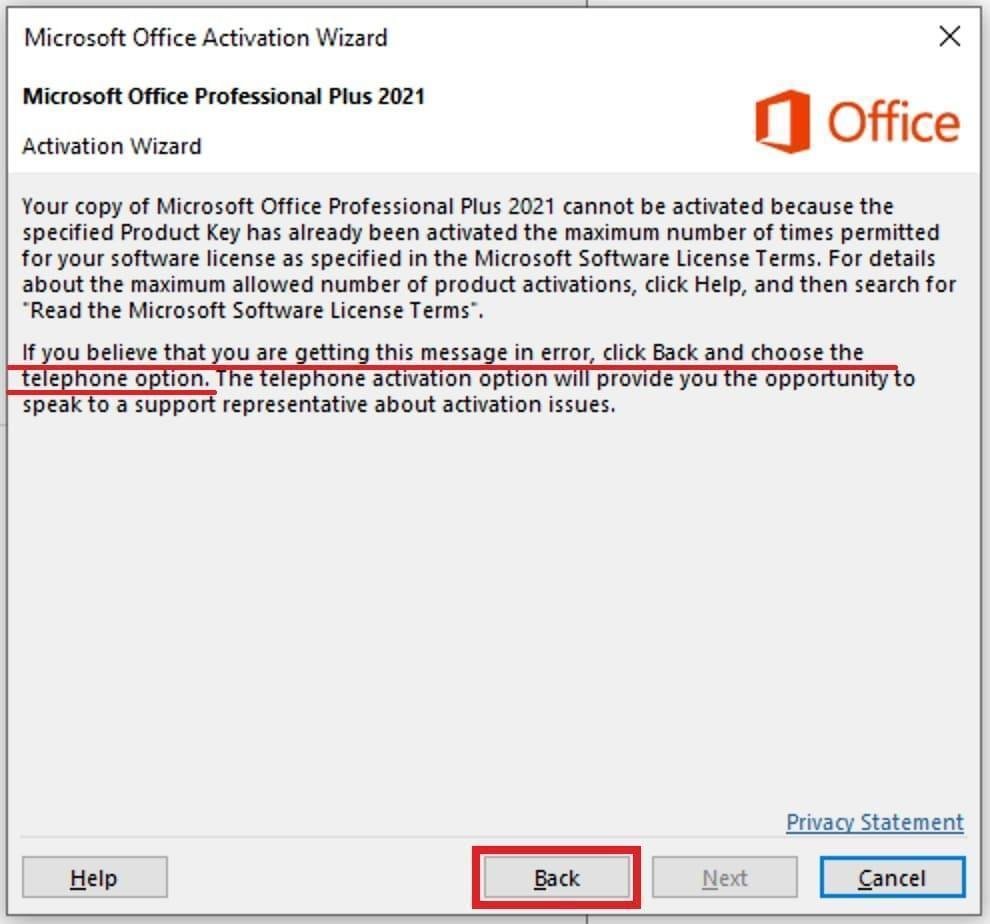
Double-check the key for typos. The letters and numbers are case-insensitive, but it is easy to confuse B and 8, or O and 0. If the error continues, use the phone activation method above, it bypasses most online activation errors.
Still stuck? Contact our support team, we help with installation and activation for free, 24/7.
Frequently Asked Questions
Where can I download Microsoft Office 2021 Professional Plus?
After you buy a license from us, we email you a secure link to the official Microsoft installer along with your product key. That way your office 2021 pro plus download is the genuine Microsoft file, not a modified copy.
How do I download Office 2021 with my product key?
The installer and the key are separate. First download the office 2021 professional plus file from the buttons in Step 2, install it, then enter your 25-character product key during activation in Step 4. There is no special “key-bundled” installer, the same official file works with every valid key.
Is there an Office 2021 ISO download?
Yes. Many people want an office 2021 ISO download so they can keep a local copy or install on several machines. Use the official Microsoft tool method in Step 2 to download the files locally, then package them as an ISO if you wish. The result is identical to the direct installer.
Where is the Office 2021 offline installer?
The file we provide is a complete office 2021 offline installer. Once it finishes downloading, you can disconnect from the internet and install Office fully offline. You only need a connection at the very end to activate.
Is this the same as Microsoft Office LTSC Professional Plus 2021?
Yes. The one-time-purchase Office 2021 Professional Plus is delivered through Microsoft’s LTSC channel, so a microsoft office ltsc professional plus 2021 download and install are exactly what you are doing here. The steps in this guide apply to the LTSC edition too.
Is there a free Office 2021 download?
The Microsoft installer itself is free to download, but Office 2021 is not free software. You need a valid product key to activate it. Be very careful with sites offering a “free full version,” they usually bundle malware or unactivatable copies. A genuine, low-cost lifetime key from us is the safe way to get fully activated Office 2021.
What is the difference between Professional Plus, Home & Business, and Home & Student 2021?
Home & Student 2021 includes Word, Excel, and PowerPoint only. Home & Business 2021 adds Outlook. Professional Plus 2021 is the complete suite, adding Outlook, Access, Publisher, and full business features, which is why it is the most popular choice for work and professional use.
Can I download Office 2021 for Mac?
Office 2021 Professional Plus is a Windows product. On a Mac, the equivalent one-time purchase is Office Home & Business 2021, which installs through the Microsoft account or Mac App Store after you redeem your key.
Is Office 2021 Professional Plus a one-time purchase?
Yes. It is a lifetime license with no subscription and no recurring fees. You pay once and keep the suite for good.
Does Office 2021 Professional Plus work on Windows 10?
Yes, it installs and runs on Windows 10. However, Microsoft ended Windows 10 support in October 2025, so for security and long-term updates we recommend Windows 11.
Can I install Office 2021 on more than one PC?
Each license activates one PC. If you need Office on several computers, you need one license per machine. We offer multi-license bundles, just contact us.
Get Office 2021 Professional Plus Today
A genuine lifetime license, instant email delivery, the official Microsoft installer, and free activation support whenever you need it.