
Microsoft Visio
Which Microsoft Visio should I buy?
Buy Microsoft Visio Professional 2024 if you want the Visio desktop app on one Windows PC without a subscription; it is supported until 9 October 2029. Choose Visio Plan 2 ($15 per user per month) for the desktop app on up to five PCs, or Visio Plan 1 ($5) if browser-only diagrams are enough.
In this article
At a glance
Microsoft Visio: key facts
| Current version | Visio 2024 (Standard and Professional) |
|---|---|
| Visio 2024 support ends | 9 October 2029 |
| Visio 2021 support | Ended 13 October 2026 |
| Visio 2016 and 2019 support | Ended 14 October 2025 |
| Visio Plan 1 | $5 per user/month, paid yearly; web app only |
| Visio Plan 2 | $15 per user/month, paid yearly; web app plus desktop app on up to 5 PCs per user |
| Visio in Microsoft 365 | Free lightweight web app in Microsoft 365 work and school plans |
| Desktop app runs on | Windows only |
Source: Microsoft Lifecycle and Microsoft Visio pricing, checked 24 November 2026.
What is Microsoft Visio used for?
Microsoft Visio is a diagramming app. People use it to draw flowcharts, org charts, network and cloud diagrams, floor plans, database models and business process maps from ready-made templates and shapes. Visio Professional can also link a diagram to live data, for example an Excel sheet, so the drawing updates when the data changes (Microsoft: compare Visio versions).
Typical users are IT and network teams, project managers, engineers, facility planners and office managers who need clear diagrams in a standard format colleagues can open.
Which Visio version should I buy?
It depends on whether you need the desktop app and how you want to pay. Subscriptions are billed per user and always get new features. One-time licenses are paid once and get security updates until their end-of-support date (Microsoft: compare Visio options).
| Option | How you pay | Desktop app | Supported until | Best for |
|---|---|---|---|---|
| Visio in Microsoft 365 | Included in Microsoft 365 work and school plans | No, browser only | Ongoing SUPPORTED | Viewing and simple diagrams |
| Visio Plan 1 | $5 per user/month, paid yearly | No, browser only | Ongoing SUPPORTED | Teams that diagram online |
| Visio Plan 2 | $15 per user/month, paid yearly | Yes, up to 5 PCs per user | Ongoing SUPPORTED | Heavy users who want new features |
| Visio Standard 2024 | One-time purchase | Yes, 1 Windows PC | 9 Oct 2029 SUPPORTED | Basic business diagrams |
| Visio Professional 2024 | One-time purchase | Yes, 1 Windows PC | 9 Oct 2029 SUPPORTED | Network, process, database and engineering diagrams |
| Visio Professional 2021 | One-time purchase | Yes, 1 Windows PC | Ended 13 Oct 2026 ENDED | Only to match an existing 2021 setup |
For context, the Microsoft Store lists Visio Professional 2024 at $579.99 (November 2026). Visio Plan 2 includes the same desktop features as Visio Professional 2024. If you’re weighing a subscription against a one-time purchase in general, our Office 2024 vs Microsoft 365 guide compares the cost over time.
Is Microsoft Visio free?
Only for viewing and basic diagrams. There’s no free Visio desktop app, but you have three free options:
- Visio in Microsoft 365: a lightweight web app included in Microsoft 365 work and school plans for flowcharts and other basic diagrams. It isn’t available in Microsoft 365 Personal or Family (Microsoft: Visio for the web FAQ).
- View a file in your browser: upload a Visio file to OneDrive and open it there to view it without a Visio license.
- Visio Viewer: a free Microsoft download for Windows that lets you view and print Visio drawings (Microsoft: free Visio Viewer).
If you only draw a diagram now and then, a free tool such as draw.io may be enough and can import many Visio files. Buy Microsoft Visio when you edit Visio files regularly or need its industry-standard shapes.
Is Visio included in Office or Microsoft 365?
No, the Microsoft Visio desktop app is always sold separately. Office 2024 Professional Plus and the Microsoft 365 desktop apps don’t include it; our Office 2024 Professional Plus download guide lists exactly which apps you get. Microsoft 365 work and school plans include only the lightweight Visio web app; the full app needs Visio Plan 2 or a one-time Visio license (Microsoft: about Visio in Microsoft 365).
Visio Standard or Professional: what’s the difference?
Professional adds the tools technical teams need. Both are one-time licenses for one Windows PC; Visio Plan 2 has the same features as Professional (Microsoft: Visio Standard 2024).
Visio Standard 2024
- Flowcharts, org charts and timelines
- Basic office and home floor plans
- Comments and sharing through OneDrive or SharePoint
Visio Professional 2024
- Everything in Standard
- Shapes and validation for BPMN 2.0, UML 2.5 and IEEE
- Network, Azure and database model diagrams
- Diagrams linked to live data, such as Excel
Can I use Microsoft Visio on a Mac?
Not as a desktop app. Visio Standard and Professional run on Windows only. On a Mac you can use Visio for the web in a browser, but it needs a Microsoft 365 work or school account; personal accounts such as outlook.com aren’t supported (Microsoft: Visio plans). The other route is Windows in a virtual machine, which needs its own Windows license (see Windows 11 Home vs Pro to pick an edition).
Is Visio 2021 still supported?
No. Visio 2021 reached end of support on 13 October 2026, and Visio 2016 and 2019 ended on 14 October 2025 (Microsoft: ending support in 2026). These versions still open and run, but they get no more security updates or fixes. Office 2021 ended on the same day; our Office 2021 vs Office 2024 guide explains what changes. Visio 2024 is the current one-time version and is supported until 9 October 2029 (Microsoft Lifecycle: Visio 2024).
How do I download, install and activate Microsoft Visio?
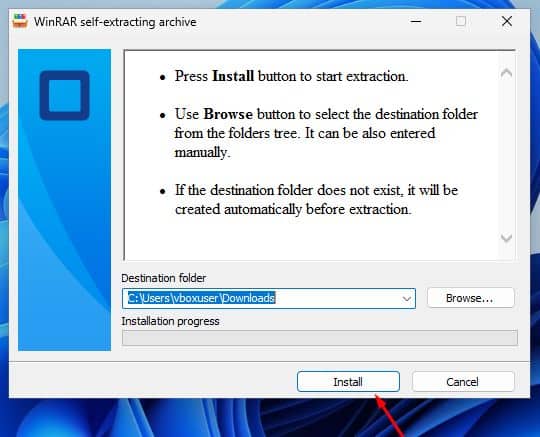
Download the installer, install it, then enter your 25-character key. Our download and installation guides cover every product we sell.
- DownloadGet the installer from your Microsoft account or from our Visio 2024 Professional guide.
- InstallClose Office apps first. Visio must match the 32-bit or 64-bit version of the Office already on your PC.
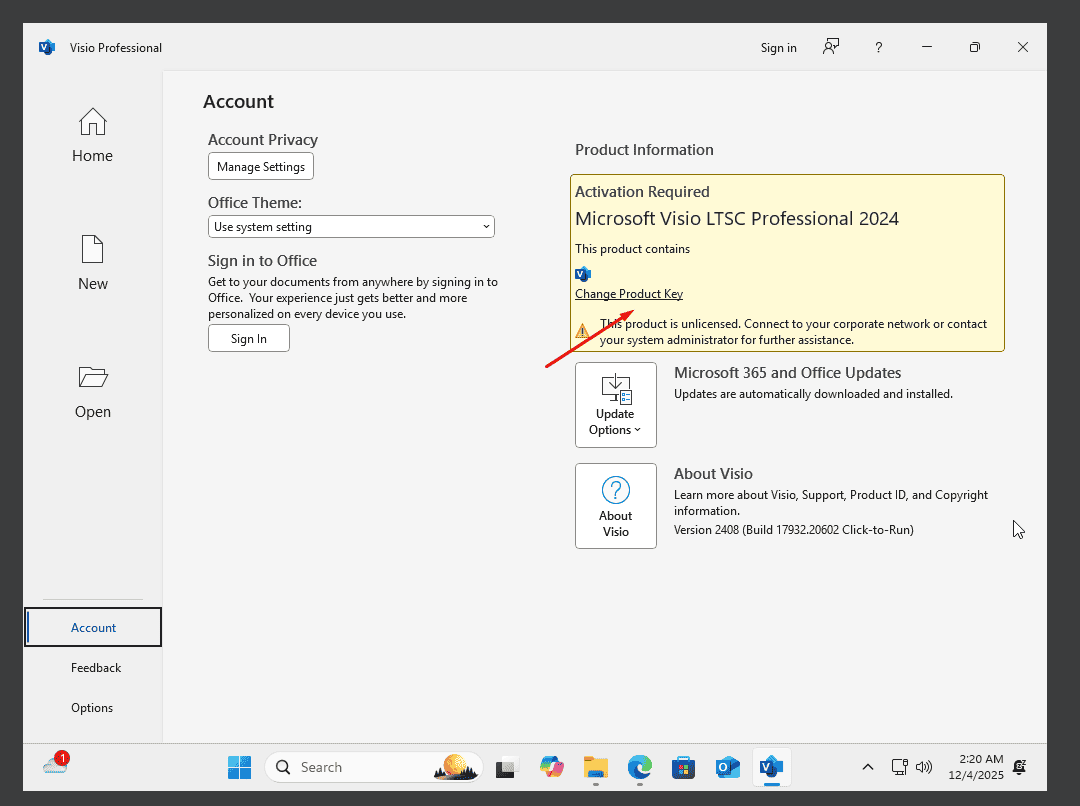
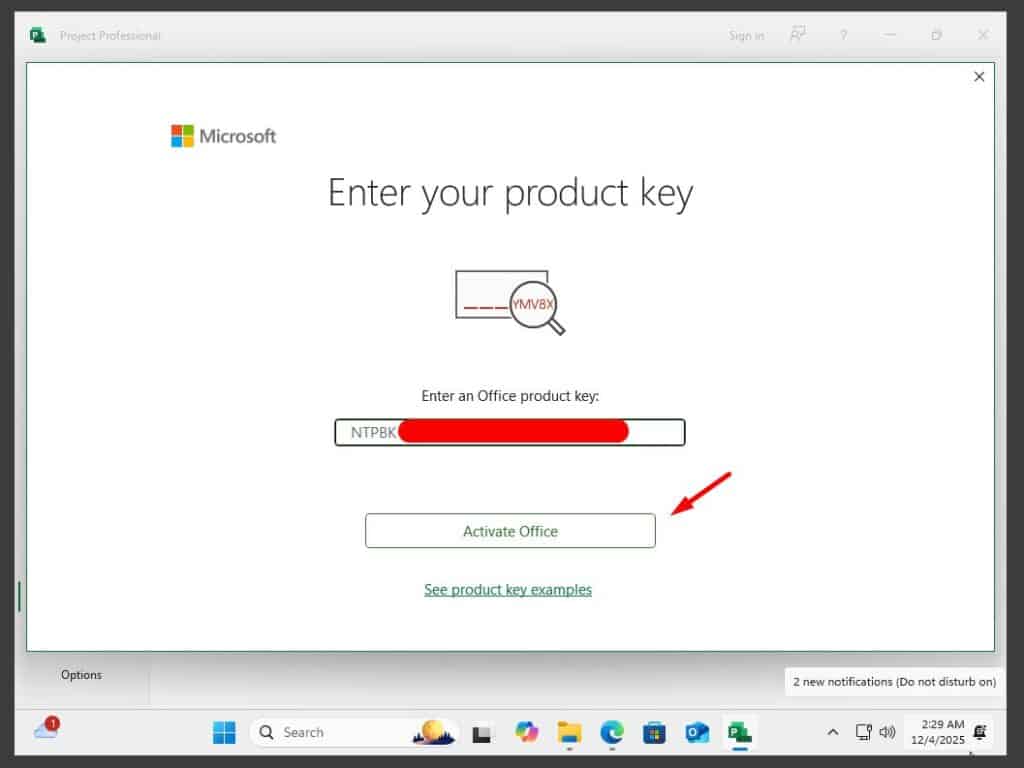
- ActivateOpen Visio, go to Account › Change Product Key and enter your key. If online activation fails, use phone activation with our free Get CID tool.
Where can I buy a Microsoft Visio license?
From Microsoft or from a reseller. Microsoft Visio is sold in two ways. Subscriptions (Plan 1 and Plan 2) are sold by Microsoft. One-time licenses are sold by Microsoft and by resellers such as Urlicenses (who we are). We sell the licenses below; this page isn’t written or endorsed by Microsoft.
| License | Price at Urlicenses | Supported until | Download guide |
|---|---|---|---|
 Visio Professional 2024 | $14.99 | 9 Oct 2029 | Visio 2024 Pro guide |
 Visio Professional 2021 | $9.90 | Ended 13 Oct 2026 | Visio 2021 Pro guide |
Choose 2024 for a new install
Visio 2021 still runs, but it no longer gets security updates. Pick it only if your team must match an existing Visio 2021 setup. You can see every Visio key we stock in the Visio category.
FAQ
Microsoft Visio: frequently asked questions
How many computers does a Visio 2024 license cover?
One Windows PC. For more PCs, buy one license per PC, or use Visio Plan 2, which covers up to five PCs per user.
Can I install Visio next to Office 2024 or Microsoft 365?
Yes, as long as both use the same 32-bit or 64-bit version. Close all Office apps before you install Visio.
How can I open a Visio file without Visio?
Upload it to OneDrive and open it in your browser, or install Microsoft’s free Visio Viewer on Windows. Both let you view the drawing but not edit it.
Can Visio 2024 open older Visio files?
Yes. Visio 2024 opens older .vsd drawings and saves in the newer .vsdx format. You can also save a copy in the Visio 2003–2010 format for people on older versions.
Is Microsoft discontinuing Visio?
No. Microsoft still sells Visio Plan 1, Visio Plan 2 and the Visio 2024 one-time versions, and Visio 2024 is supported until 9 October 2029. Only older versions such as Visio 2016, 2019 and 2021 are out of support.
What if Visio won’t activate online?
Choose phone activation, copy the Installation ID, and get the Confirmation ID from our free Get CID page. If that fails too, contact our support team.
Keep reading
Related pages

About the author
Sources
- Visio 2024 – Microsoft Lifecycle
- Ending support in 2026 – Microsoft Lifecycle
- Everything you should know about Visio 2016 and Visio 2019 end of support – Microsoft Tech Community
- Compare Visio options – Microsoft
- Visio plans and pricing – Microsoft
- Compare Visio versions and features – Microsoft Support
- About Visio in Microsoft 365 – Microsoft Support
- Visio for the web FAQ – Microsoft Support
- View Visio files for free – Microsoft
- Visio Standard 2024 – Microsoft