
If you are weighing Office 2024 vs Microsoft 365, here is the short answer: buy Office 2024 if you want to own the apps once and skip cloud and AI extras, and choose Microsoft 365 if you want Copilot, 1 TB of cloud storage, and apps that update forever. One is a single payment. The other is a subscription you keep paying.
This guide breaks down the real differences in price, features, AI, and support, so you can pick the right one in 2026 without overpaying for things you will never use.
Key Takeaways
- Office 2024 is a one-time purchase you own forever; Microsoft 365 is a yearly subscription.
- Copilot AI and 1 TB OneDrive are Microsoft 365 only. Office 2024 has neither.
- Microsoft raised 365 prices in January 2025 to $99.99/year for Personal when it bundled Copilot into paid plans (Microsoft).
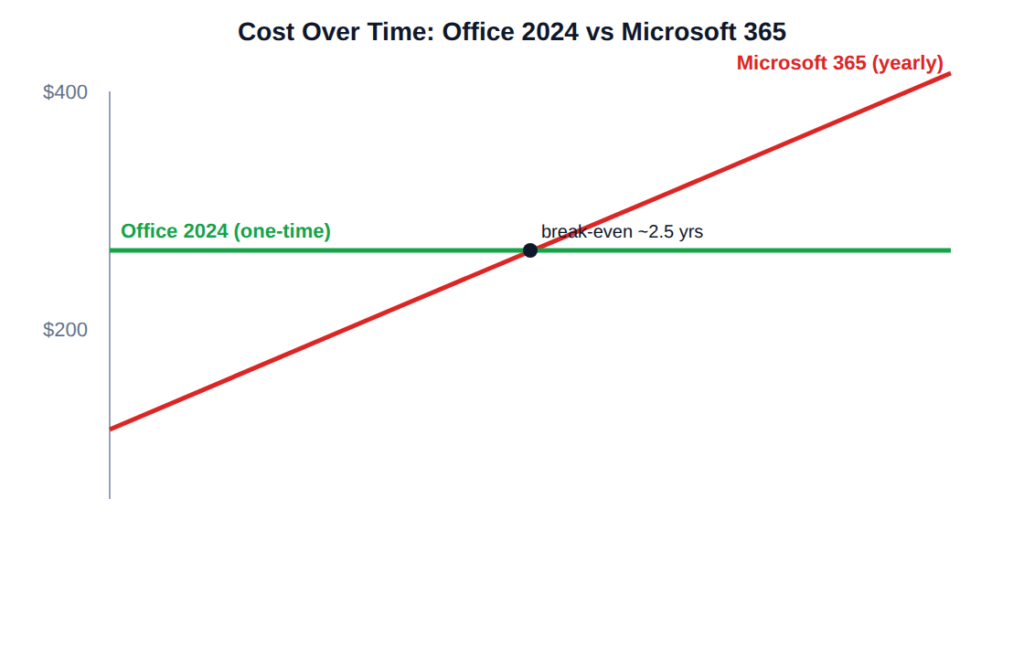
- If you keep the same version for 3+ years, a perpetual Office 2024 license is almost always cheaper.
Office 2024 vs Microsoft 365: What Is the Real Difference?
The core difference is ownership. Office 2024 is a perpetual license, meaning you pay once and keep that exact version forever. Microsoft 365 is a subscription that rents you the same apps plus cloud services, and it stops working if you stop paying.
Office 2024 installs the classic desktop apps on one PC or Mac and runs fully offline. Microsoft 365 adds OneDrive cloud storage, multi-device installs, mobile apps, and Copilot AI, but only while your subscription is active. So the question of Office 2024 vs Microsoft 365 is really “own a fixed toolset” versus “rent an evolving one.”
How Much Does Each Cost in 2026?
In 2026, Microsoft 365 Personal costs $99.99 per year (or $9.99/month) and Family runs $129.99 per year for up to six people (Microsoft). In January 2025, Microsoft raised those prices for the first time in over a decade and folded Copilot into every paid plan.
Office 2024 is a single payment with no renewal. Microsoft’s list price for Office Home & Business 2024 sits near $249.99, but authorized resellers price genuine keys far lower. The math is simple: three years of Microsoft 365 Personal costs about $300, while a one-time Office 2024 license never charges
Does Office 2024 Include Copilot AI?
No. Copilot is exclusive to Microsoft 365, and that is the single biggest dividing line in the Office 2024 vs Microsoft 365 decision. Office 2024 ships with offline tools like improved search and grammar checks, but it has no generative AI built into Word, Excel, or PowerPoint.
So the honest test is this: do you actually want AI inside your documents? If you draft, summarize, or analyze data with AI daily, 365 earns its fee. If Copilot would mostly sit unused, you are paying a yearly premium for a feature you will not touch, and Office 2024 makes more sense.
Which Apps and Features Come With Each?
Both give you the desktop apps most people need: Word, Excel, PowerPoint, and Outlook. Microsoft 365 layers extras on top, while Office 2024 keeps it lean and local. The gap is less about the core apps and more about everything around them.
Microsoft 365 adds 1 TB of OneDrive storage per person, installs on multiple devices, includes phone and tablet apps, and gets new features continuously. Office 2024 installs on one device, stores files locally, and stays exactly as it shipped. Note that Microsoft Publisher reached end of life in October 2026, so neither option keeps it long-term.
How Long Is Each Version Supported?
Office 2024 receives security updates for five years, through October 2029 (Microsoft lifecycle). After that the apps still open and run, but stop getting patches. Microsoft 365 is “always current,” so it never reaches an end-of-support date as long as you subscribe.
For most home and small-business users, five years of support is plenty before an upgrade makes sense anyway. If you would rather compare the two perpetual versions first, see our guide on Office 2021 vs Office 2024.
Office 2024 vs Microsoft 365: Side-by-Side Comparison
| Feature | Office 2024 | Microsoft 365 |
|---|---|---|
| Payment model | One-time purchase | Yearly subscription |
| 2026 cost | Pay once | $99.99/yr (Personal) |
| Copilot AI | No | Yes |
| Cloud storage | None | 1 TB OneDrive |
| Feature updates | Locked at release | Continuous |
| Devices | 1 PC or Mac | Multiple + mobile |
| Support window | Until Oct 2029 | Always current |
| Best for | Own it once, work offline | AI, cloud, teams |
Which One Should You Buy?
Choose based on how you actually work, not on the longer feature list. Microsoft 365 wins on AI and collaboration; Office 2024 wins on cost and simplicity. Here is the quick decision.
Choose Office 2024 if you want to pay once, work mostly offline, use one main computer, and do not need Copilot or cloud storage. It is the cheaper long-term choice for students, home users, and businesses that value stability. You can grab a genuine, low-cost key for Office 2024 Professional Plus or Office 2024 Home & Business.
Choose Microsoft 365 if you want Copilot AI, 1 TB of OneDrive, apps on several devices, and constant updates, and you are comfortable paying every year. It fits households, frequent collaborators, and anyone building AI into daily document work.
Our take: For the buyers we serve most, a one-time Office 2024 license is the better value. Copilot is the only feature that genuinely justifies the recurring fee, and most people do not use it enough to break even.
Frequently Asked Questions
Can I use Office 2024 without a Microsoft 365 subscription?
Yes. Office 2024 is a standalone perpetual license, so it works fully without any subscription. You pay once, activate it on one PC or Mac, and use Word, Excel, PowerPoint, and Outlook offline for as long as you like, with security updates through October 2029.
Is Microsoft 365 the same as Office 365?
Yes, Office 365 was renamed Microsoft 365 in 2020. It is the same subscription family, now bundled with Copilot AI, 1 TB of OneDrive, and continuous updates. When comparing Office 2024 vs Microsoft 365, treat any “Office 365” pricing you see as Microsoft 365 pricing.
Does Office 2024 get new features over time?
No. Office 2024 is locked to the features it shipped with and only receives security and stability patches, not new tools. If you want new features and AI added continuously, Microsoft 365 is the version that keeps evolving. Office 2024 stays exactly as you bought it.
Can I switch from Microsoft 365 to a one-time license?
Yes. You can let your Microsoft 365 subscription lapse and install Office 2024 instead. Your files stay safe in OneDrive or locally, and Office 2024 opens them normally. Many users switch once they realize they rarely use Copilot or the extra cloud storage.
Are cheap Office 2024 keys legitimate?
They can be, if you buy from an authorized reseller that delivers genuine Microsoft keys. Prices well below retail are normal in this market, but avoid sellers with no guarantee. Urlicenses delivers genuine Office 2024 keys by email within minutes, backed by activation support.
The Bottom Line
In the Office 2024 vs Microsoft 365 debate, there is no single winner, only the right fit. Pick Microsoft 365 if Copilot AI, cloud storage, and always-updated apps matter to you and a yearly fee is fine. Pick Office 2024 if you would rather pay once, own your software, and keep more money over time.
For most home and business users in 2026, a genuine one-time Office 2024 license delivers everything they need at a fraction of the long-term cost. Ready to buy? Get a genuine key for Office 2024 Professional Plus and own your Office for good.