
Windows 11 Pro and Windows 11 Enterprise are the same operating system with the same interface, the same apps and the same performance. The practical difference is not really a feature list at all. It is how you are allowed to buy each one, and who the extra features are built for.
This Windows 11 Pro vs Enterprise comparison covers what Enterprise genuinely adds, why most businesses never need it, how Microsoft licenses each edition, and where Education and Pro for Workstations fit in.
On this page
- Quick answer: which one do you need?
- The biggest difference is how you buy it
- Full feature comparison
- What Enterprise actually adds
- Is Enterprise faster or more secure?
- Pro vs Enterprise vs Education vs Workstations
- How to check which edition you have
- How to move from Pro to Enterprise
- So which should you buy?
- Frequently asked questions
Quick answer: which one do you need?
Almost everyone should choose Pro. Not because Enterprise is worse, but because Enterprise is not designed to be bought by individuals or small teams, and the features it adds only make sense when you are managing dozens or hundreds of machines centrally.
| Choose Windows 11 Pro if | Choose Windows 11 Enterprise if |
|---|---|
| You are an individual, a freelancer or a small business | You have an IT department managing a fleet of machines |
| You want BitLocker, Remote Desktop, Hyper-V and domain join | You need application whitelisting with AppLocker |
| You want a one-time purchase | You already pay for Microsoft 365 E3 or E5 |
| You manage your own PC, or a handful of them | You need Credential Guard against credential theft attacks |
| Your machine has 2 TB of RAM or less | You run Azure Virtual Desktop at scale |
The biggest difference in Windows 11 Pro vs Enterprise is how you buy it
This is the part most comparisons bury, and it is the one that decides the question for most people.
Pro is a normal licence. It comes preinstalled on business laptops, or you buy it outright as a one-time purchase and it stays with that machine for good.
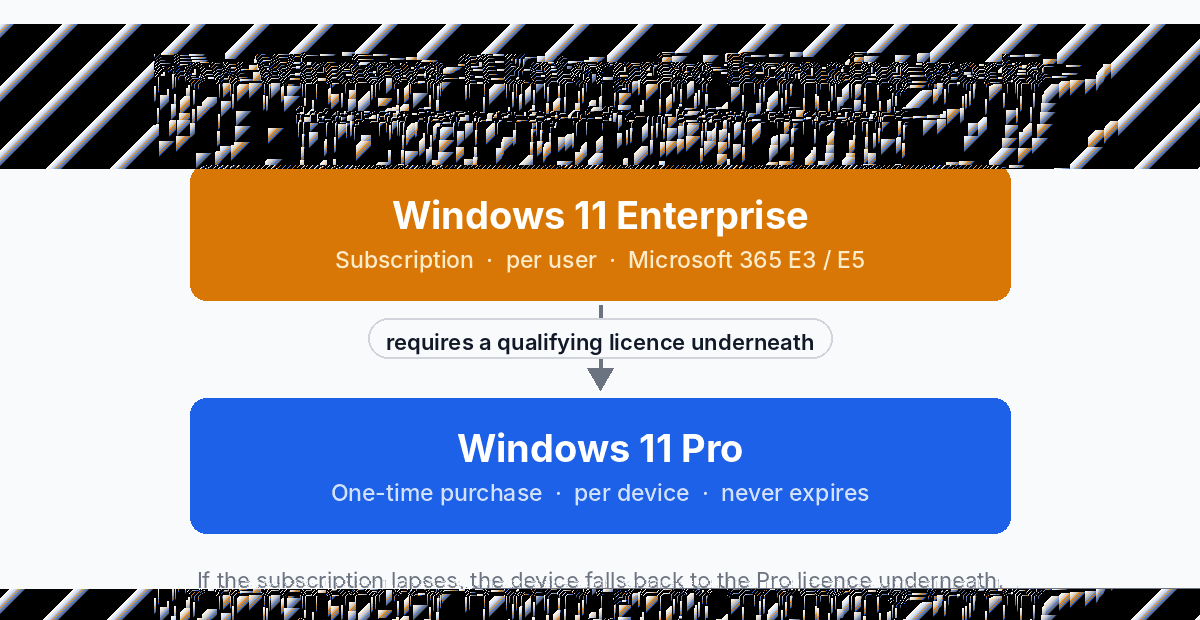
Enterprise is not sold off the shelf. Microsoft licenses it as a per-user subscription, normally bundled into Microsoft 365 E3 or E5, or through a volume licensing agreement. Two consequences follow from that, and they catch people out constantly:
- Enterprise sits on top of Pro. It is not an alternative to it. The machine needs a qualifying Pro licence underneath before Enterprise can be applied, so you are not choosing between them so much as deciding whether to add Enterprise later.
- It is per user, not per device. One licensed user can typically run Enterprise on up to five devices, which is why it suits organisations and makes very little sense for a single PC.
- It stops when the subscription stops. Let the Microsoft 365 licence lapse and the machine falls back to its underlying edition. Pro, bought once, does not expire.
Windows 11 Pro vs Enterprise: full feature comparison
In the Windows 11 Pro vs Enterprise comparison, everything in Pro is also in Enterprise. Enterprise never removes anything. These are the differences.
| Feature | Windows 11 Pro | Windows 11 Enterprise |
|---|---|---|
| BitLocker drive encryption | Yes | Yes |
| Remote Desktop host | Yes | Yes |
| Hyper-V and Windows Sandbox | Yes | Yes |
| Group Policy, domain and Entra ID join | Yes | Yes |
| AppLocker application control | Limited | Full whitelisting |
| Credential Guard | No | Yes |
| Microsoft Defender for Endpoint | Baseline Defender only | With E5 licensing |
| Universal Print | Limited | Full support |
| Azure Virtual Desktop | Basic | Enhanced, including multi-session |
| Mobile device management | Basic | Enhanced |
| Long-term servicing channel (LTSC) | No | Yes |
| Maximum RAM | 2 TB | 6 TB |
| How it is licensed | One-time purchase, per device | Subscription, per user, on top of Pro |
| Performance and gaming | Identical | Identical |
What Windows 11 Enterprise actually adds
Four rows in the Windows 11 Pro vs Enterprise table above are the real reasons an organisation pays for Enterprise rather than stopping at Pro. The rest is detail.
AppLocker, properly
Pro can block some applications. Enterprise lets you build a whitelist: nothing runs on the machine unless you have explicitly allowed it. That is a completely different security posture, and in regulated industries it is often a requirement rather than a preference. For a single user it is overkill and genuinely annoying to maintain.
Credential Guard
Credential Guard uses virtualisation to isolate login secrets so that malware with administrator rights still cannot harvest them. It is the defence against pass-the-hash and credential-theft attacks that spread laterally across a corporate network. On a home PC there is no lateral network to protect, which is why Microsoft reserves it for Enterprise.
The long-term servicing channel
LTSC gives you a build of Windows that receives security updates but no feature updates for roughly a decade. It exists for machines that must not change: medical equipment, industrial controllers, ATMs, point-of-sale terminals. It is a specialist tool and Microsoft actively discourages using it on ordinary office PCs, because you give up years of improvements.
Azure Virtual Desktop multi-session
Enterprise allows several users to share one Windows virtual machine in Azure at the same time. For companies running virtual desktops at scale this changes the economics substantially. If you are not running Azure Virtual Desktop, it is worth nothing to you.
Is Windows 11 Enterprise faster or more secure out of the box?
Faster: no. In Windows 11 Pro vs Enterprise benchmarks it is the same kernel, the same scheduler and the same graphics stack. Benchmarks are identical and gaming performance is identical. Nobody has ever gained a frame per second by moving to Enterprise.
More secure: only if someone configures it. This is the honest answer and it matters. Enterprise ships with more security capability, not more security. AppLocker protects nothing until someone writes the policies. Credential Guard needs the right hardware and to be switched on. Defender for Endpoint needs an E5 licence and a team watching the alerts.
An unmanaged Enterprise machine is no safer than a well-configured Pro machine with BitLocker enabled. Buying the bigger edition is not a security strategy.
Pro vs Enterprise vs Education vs Pro for Workstations
Two other editions come up in the Windows 11 Pro vs Enterprise conversation, so here is where they sit.
| Edition | Built for | The short version |
|---|---|---|
| Pro | Professionals and small business | The sensible default. Everything most people need. |
| Enterprise | Large managed fleets | Pro plus central management and advanced security. Subscription only. |
| Education | Schools and universities | Functionally close to Enterprise, licensed to academic institutions. |
| Pro for Workstations | Heavy hardware | Pro plus 4 CPU sockets, 6 TB RAM, ReFS and SMB Direct. For serious workstations, not for management features. |
The distinction worth remembering: Enterprise and Education are about managing machines. Pro for Workstations is about hardware. If your question is really about running four CPUs or more than 2 TB of memory, you want Windows 11 Pro for Workstations, not Enterprise.
How to check which edition you have
Press Windows + R, type winver and press Enter. Or go to Settings > System > About and read the Edition line under Windows specifications. The same screen shows your activation state under System > Activation.
How to move from Pro to Enterprise
No reinstall is involved. Because Enterprise layers on top of Pro, the switch happens in place and your files, applications and settings stay exactly where they are.
In a managed organisation it usually happens automatically: the user signs in with a work account that carries a Microsoft 365 E3 or E5 licence, and the device steps up to Enterprise on its own through subscription activation. Otherwise an administrator applies the key under Settings > System > Activation > Change product key, and the machine restarts once.
Going the other way is harder. Dropping from Enterprise back to Pro generally means a clean installation, so it is worth being sure before you move up.
So which should you buy?
If you are reading this as an individual, a freelancer, or someone running a business without a dedicated IT team, the Windows 11 Pro vs Enterprise question answers itself: buy Pro. Pro already includes BitLocker, Remote Desktop hosting, Hyper-V, Windows Sandbox, the Group Policy Editor and domain join. That is the whole professional toolkit. Enterprise adds administration you have nobody to administer.
If your organisation already pays for Microsoft 365 E3 or E5, you have Enterprise rights whether you use them or not, and the sensible move is to turn on the features you are paying for rather than buy anything.
We stock Windows 11 Pro, Windows 11 Enterprise, Windows 11 Education and Pro for Workstations as lifetime keys. If you are currently on Home, the cheaper route is usually an upgrade key from Home to Pro rather than a full licence. Still weighing Windows 11 Pro vs Enterprise? Ask us and we will tell you honestly, including when the answer is that you do not need to buy anything.
Frequently asked questions
Can I buy Windows 11 Enterprise as an individual?
Not from Microsoft directly. Enterprise is licensed per user through Microsoft 365 E3 or E5 subscriptions and volume licensing agreements, and it requires a qualifying Pro licence underneath. For a single PC, Pro is the edition Microsoft intends you to buy.
Is Windows 11 Enterprise better than Pro?
In Windows 11 Pro vs Enterprise terms it is bigger, not better. Enterprise adds central management and advanced security capability that only pays off when someone configures and monitors it across many machines. On one unmanaged PC, Pro with BitLocker switched on is just as secure and considerably simpler.
Does Windows 11 Enterprise run games better?
No. Performance is identical between Pro and Enterprise. Same kernel, same graphics stack, same frame rates.
Does Windows 11 Pro have Credential Guard?
No. Credential Guard is an Enterprise feature. Pro still has BitLocker, Windows Hello, Secure Boot and virtualisation-based security, which covers the realistic threats to an individual machine.
What is the maximum RAM in Pro versus Enterprise?
Windows 11 Pro supports up to 2 TB. Enterprise supports up to 6 TB. If memory is your reason for looking at Enterprise, Pro for Workstations also reaches 6 TB and is far easier to buy.
Do I lose my files upgrading from Pro to Enterprise?
No. Enterprise applies on top of an existing Pro installation. Nothing is formatted and no reinstall is needed. Your files, programs and settings all stay in place.
What happens if the Enterprise subscription expires?
The device falls back to the edition underneath it, normally Pro. That is one of the practical arguments for owning a perpetual Pro licence rather than relying on a subscription.
Is Windows 11 Enterprise LTSC worth using?
Only for machines that must never change, such as industrial or medical equipment. On a normal office PC you would be trading away a decade of features for stability you do not need, and Microsoft advises against it.
Still deciding further down the range? Our Windows 11 Home vs Pro comparison covers the step below this one, or browse every Windows licence we stock. Microsoft publishes its own edition comparison if you want the vendor’s version.